Do you know …….
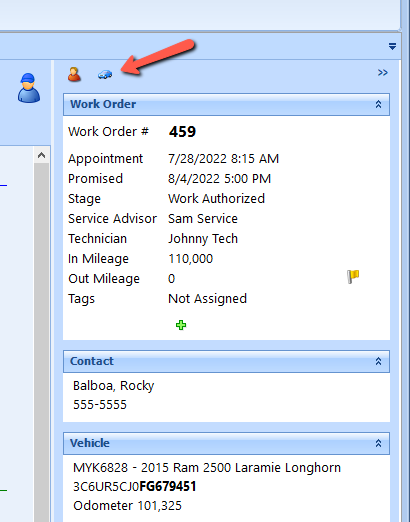
That when using the Technician View you can also open the Flyout for the Vehicle and Customer?
Just simply click on the appropriate Flyout and it opens up.
Customer Flyout - your Tech can access all Invoices for that Customer.
Vehicle Flyout – your Tech can access Vehicle set up ( along with editing ), Details, Invoices for that vehicle, Reminders, Specifications, Fitment Guide, and Carfax History.
How to search for parts, inventory, and labor times for multiple services using the Catalog look up?
Here is a tour on how to set it up and use it. Catalog Look Up
What Remedy is in Deferred Work and how to see it?
Here is a quick tour of it. Remedy Deferred Work
How to fix a mileage error in Carfax?
If it is the current day then you can Edit the Invoice and correct it.
If it is longer than that you will need to contact Carfax.
Here is the email for Carfax DataServicesMyCarfaxServiceShop@carfax.com
Please make sure to email all relevant information.
How to move Service Packages and individual lines in a Work Order?
Here is quick tour. Work Order Collapse and Move
What String Searching is?
Here is a quick tour of some examples. String Search
How to make variations of an Invoice, Authorization, or Technician Work Order?
This tour shows you how. Print Document Variations
Deducting employee benefits and remitting them is accomplished the same way other deductions are processed in the software. Examples would be 401K, RRSP, insurance, child support, etc.
Payable accounts and suppliers operated independently of each other. You can have a supplier without a payable account and you can have a payable account without a supplier. Typically, a payable account is associated with one or more suppliers (contacts). If you created a payable account and you would like to associate it with a supplier, follow the instructions in the accounts payable topic.
If you created the check by making a payment from a payable account then you can delete the payable transaction.
In any other instance you will need to enter a manual general ledger transaction to reverse the check.
If you wish to remove a credit adjustment or payment made to an account, you can do so by using the delete receivable transaction function. A very common application for this is to reverse an NSF transaction.
You can't delete a credit invoice. You would need to either adjust the transaction or enter a manual general ledger transaction.
Any time you are on a field with editable text you can press the F7 key to open the spell check feature.